This article was originally written in Portuguese. Read the original.
The goal of this lab is to show a basic way to configure a connection pool to manage database connections!
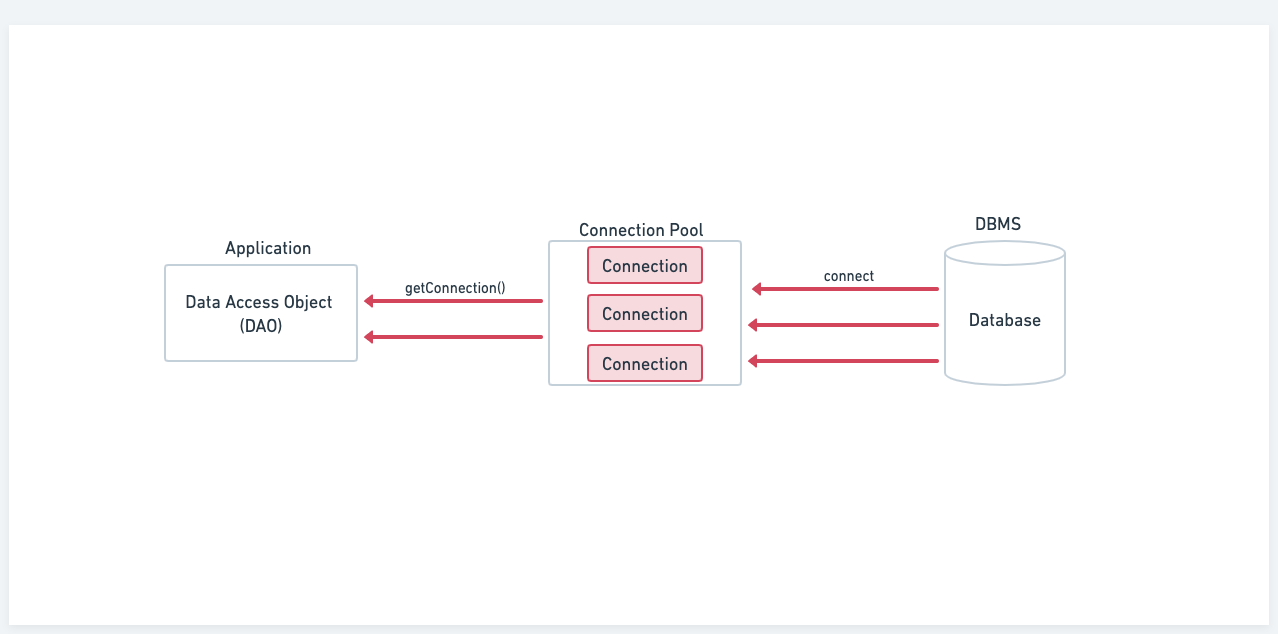
A connection pool is a technique used to improve the performance of applications that frequently use database connections.
In this tutorial I will show how to implement a connection pool in Java using the Apache Commons DBCP; library.
It is important to mention that there are several libraries available to implement a connection pool in Java.
Some popular alternatives include HikariCP, C3P0 and Tomcat JDBC Pool. However, for this tutorial we will use Apache Commons DBCP, since it is a widely used library with a large support community.
After completing this tutorial, you should be able to:
- Implement a connection pool using the Apache Commons DBCP library;
If you want to watch this tutorial as a video, I made it available on YouTube (in Portuguese): Criando e configurando um Connection Pool com Apache Commons DBCP.
Step 1: Adding the dependency
In IntelliJ IDEA, open the project configuration file called “pom.xml” (usually located at the root of the project).
Find the <dependencies> section and add the following dependency:
<dependency>
  <groupId>org.apache.commons</groupId>
  <artifactId>commons-dbcp2</artifactId>
  <version>2.9.0</version>
</dependency>
No code should be removed in this step. Just add the new dependency to pom.xml!
Save all changes (CTRL + S)
NOTE: After saving the changes, IntelliJ IDEA should automatically sync the configuration file changes and download the Apache Commons DBCP library.
Step 2: Creating the connection pool class
In IntelliJ IDEA, navigate to your application’s main package, right-click it, select New / Package, type config and press ENTER.
After creating the config package, right-click the config package and select New / Java Class.
Name the class “ConnectionPoolConfig” and click “OK”.
Step 3: Open the class we just created and implement a static method called getDataSource that takes no parameters and returns an object of type BasicDataSource, as in the following code:
import org.apache.commons.dbcp2.BasicDataSource;

public class ConnectionPoolConfig {

    private static BasicDataSource dataSource;

    public static BasicDataSource getDataSource() {

    }

}
NOTE: Don’t forget to import the BasicDataSource class from the org.apache.commons.dbcp2 package. To import it in IntelliJ, right-click the class name, use the shortcut (ALT + ENTER) and select the import class option.
Step 4: Now that we have our BasicDataSource class and our getDataSource() method, let’s start the implementation.
The first part of the implementation is a conditional check that verifies whether the dataSource variable is null.
The resulting code should look like the following:
package br.com.carstore.config;

import org.apache.commons.dbcp2.BasicDataSource;

public class ConnectionPoolConfig {

    private static BasicDataSource dataSource;

    private static BasicDataSource getDataSource() {

        if (dataSource == null) {

        }

        return dataSource;

    }

}
If this conditional check is true, we will create a new dataSource. If it is false, it means a dataSource has already been created, so it will be returned and no further action will be taken.
Step 5: Assuming the conditional check is true, we need to create a new dataSource. To do that, we will create a new instance of BasicDataSource and set a few parameters:
- URL
- Username
- Password
- Min Idle
- Max Idle
- Max total
Some of these parameters are self-explanatory, such as url, username and password. The other three parameters (Min Idle, Max Idle and Max total), however, need a description.
These parameters are required so that our connection pool (BasicDataSource) can be configured correctly. They may also vary according to your application’s characteristics.
Here is a brief description of what these parameters do:
- MinIdle: minimum number of idle connections in the pool
- MaxIdle: maximum number of idle connections in the pool
- MaxTotal: maximum total number of connections in the pool
Finally, let’s add a feedback message for our users indicating that a new connection pool was created successfully.
The resulting code should look like the following:
package br.com.carstore.config;

import org.apache.commons.dbcp2.BasicDataSource;

import java.sql.Connection;
import java.sql.SQLException;

public class ConnectionPoolConfig {

    private static BasicDataSource dataSource;

    private static BasicDataSource getDataSource() {

        if (dataSource == null) {
            dataSource = new BasicDataSource();
            dataSource.setUrl("jdbc:h2:~/test");
            dataSource.setUsername("sa");
            dataSource.setPassword("sa");
            dataSource.setMinIdle(5);   // Minimum number of idle connections in the pool
            dataSource.setMaxIdle(10);  // Maximum number of idle connections in the pool
            dataSource.setMaxTotal(50); // Maximum total number of connections in the pool

            System.out.println("New connection pool created with successful");

        }

        return dataSource;

    }

}
Step 6: Creating the getConnection method
Now that the getDataSource method is properly implemented, let’s create the method that returns a database connection to users.
To do that, we will create a new static method called getConnection that returns a Connection.
The resulting code should look like the following:
public static Connection getConnection() throws SQLException {

    return getDataSource().getConnection();

}
Step 7: Creating a private constructor
Now that the getDataSource() and getConnection() methods are in place, we need a private constructor that calls getDataSource to start a new connection pool as soon as our ConnectionPoolConfig class is used for the first time.
The resulting code should look like the following:
private ConnectionPoolConfig() {

    getDataSource();

}
With the whole implementation done, the ConnectionPoolConfig class should look like the following:
package br.com.carstore.config;

import org.apache.commons.dbcp2.BasicDataSource;

import java.sql.Connection;
import java.sql.SQLException;

public class ConnectionPoolConfig {

    private static BasicDataSource dataSource;

    private ConnectionPoolConfig() {

        getDataSource();

    }

    private static BasicDataSource getDataSource() {

        if (dataSource == null) {
            dataSource = new BasicDataSource();
            dataSource.setUrl("jdbc:h2:~/test");
            dataSource.setUsername("sa");
            dataSource.setPassword("sa");
            dataSource.setMinIdle(5);   // Minimum number of idle connections in the pool
            dataSource.setMaxIdle(10);  // Maximum number of idle connections in the pool
            dataSource.setMaxTotal(50); // Maximum total number of connections in the pool

            System.out.println("New connection pool created with successful");

        }

        return dataSource;

    }

    public static Connection getConnection() throws SQLException {

        return getDataSource().getConnection();

    }

}
Save all changes (CTRL + S)
Step 8: Creating a class to test the connection pool
In IntelliJ IDEA, navigate to your application’s main package, right-click it and select “New” -> “Java Class”. Name the class “Main” and click “OK”.
Replace the generated code with the following:
import java.sql.Connection;
import java.sql.SQLException;

public class Main {

    public static void main(String[] args) {

        Connection connection = null;

        try {

            connection = ConnectionPoolConfig.getConnection();
        // Use the connection to run your database operations

    } catch (SQLException e) {

        e.printStackTrace();

    } finally {

        if (connection != null) {

            try {

                connection.close();

            } catch (SQLException e) {

                e.printStackTrace();

            }

        }

    }

}
Now the methods no longer open connections directly, because opening new connections is now the responsibility of our BasicDataSource class.
Here we are applying the S in SOLID.
Review everything that has been done so far!
Step 9: Save all changes (CTRL + S) and run your application.
When you run your application, notice that its behavior did not change, but the message (“New connection pool created with successful”) is written only once to stdout.
This behavior is expected, because our application now reuses connections that have already been opened, are available and are managed by our connection pool.
Congratulations! 👍
You added a connection pool to your application using the Apache Commons DBCP library, and now your application manages database connections efficiently.